.png?width=300&height=300&name=Untitled%20design%20(6).png)
Follow these steps to easily add a new operator to a merchant account:
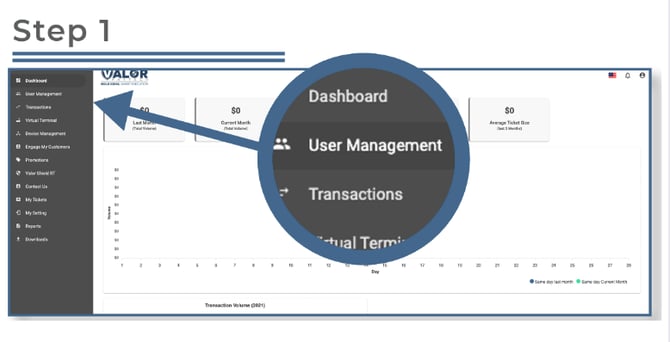
Step 1: Access User Management
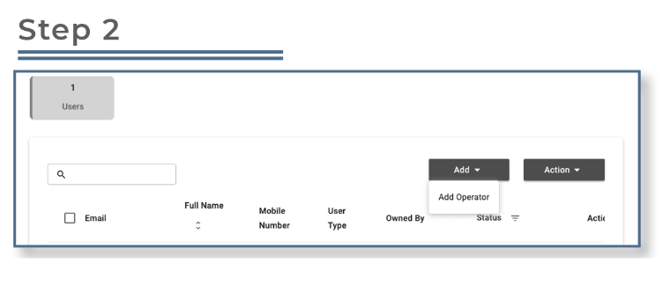
Step 2: Add a New Operator
-
Click on the Add button.
-
From the dropdown menu, select Add Operator.
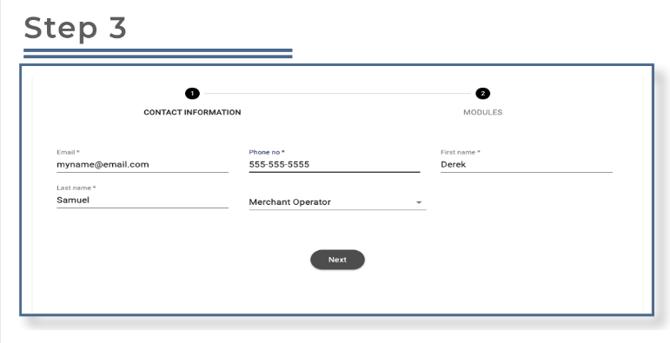
Step 3: Enter Operator Information
-
You will need to enter the operator's basic information, which includes:
-
First Name
-
Last Name
-
Email Address
-
Phone Number
-
-
Once the details are entered, click Next to proceed.
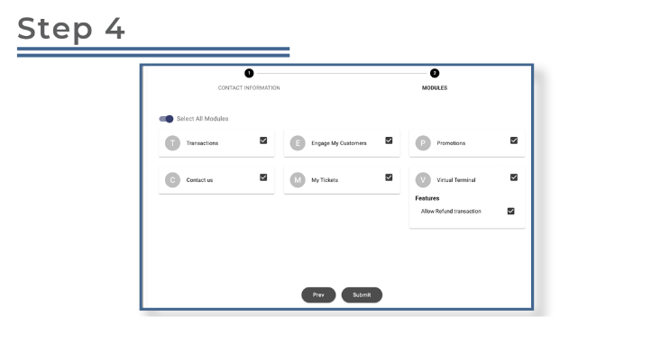
Step 4: Assign Module Access
-
Select the modules or features you want the operator to have access to.
Modules typically include areas like account settings, reporting, and transaction management. -
Once you've selected the appropriate modules, click Submit.
Step 5: Operator Account Setup
-
After submitting, the operator will receive an email and a text message containing a link to create their password.
-
The operator can now click the link, create their password, and gain access to their operator account.
Once the password is set up, the operator can log in at the following URL: https://online.valorpaytech.com/signin