Jobber POS Integration
About
Jobber is the command centre for home service businesses. Our easy-to-use app powers sales, operations, and customer service; all in one place.
Website: Jobber
| Category | Details |
|---|---|
| Integration Type |
Cloud: Browser Extension Training: POS+ Extension Training Installation: Installing POS+ Extension |
| Features |
Card on File Stored card to quickly recharge a known customer. Deposit Payments Take a down payment against an invoice. Estimate Payments Take a payment from an estimate. Not active; on roadmap. Refund Process refunds directly through the platform. Split Refund Refund a partial amount of a purchase. Void Void transactions before settlement. |
| Browser Extension Payment Flows |
Push to Terminal Payment Links Keyed Transactions Keyed ACH |
Important Notes
Once a payment flow has been built for a software, it becomes available to all users.
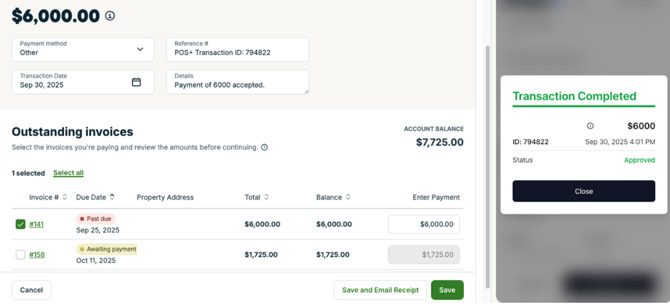
Notes:
- The Jobber invoice must be out of Draft status to be paid.
- Payment Links reconcile by pressing Reconcile in POS+.
- Ensure that the amount charged by POS+ matches the invoice the merchant wants to pay in Jobber.
- See screenshot that shows multiple invoices for a given customer. By default, POS+ will apply the payment to the Details field to be confirmed by the user.

Marketing Demo Video
Browser Extension
Demo Video- POS+ Extension- Jobber
POS+ will assist you with onboarding your account until a demo video becomes available.
Dashboard
N/A - not built yet.
Integration Type
This integration requires the POS+ Browser Extension to be installed and active within your supported browser.
Support
- Turn off two factor authentication where possible. This can prevent POS+ access.
Note:As of 9/21/25, Jobber mandates 2FA. 2FA can be turned off by disabling Jobber Payments.
- Ensure the software username and password in the POS+ portal are always up to date. This can prevent POS+ access
- If the integration does not work AND you are on the correct invoice page in the software, please contact POS+.