.png?width=300&height=300&name=Untitled%20design%20(6).png)
About
Mitchell1 is a leading American software provider that produces comprehensive repair information, diagnostic tools, and shop management software for the automotive and heavy-duty truck repair industries.
Website: Mitchell1 SE
Important Notes
Once a payment flow has been built for a software, it becomes available to all users.
Reconciliation Payment Type
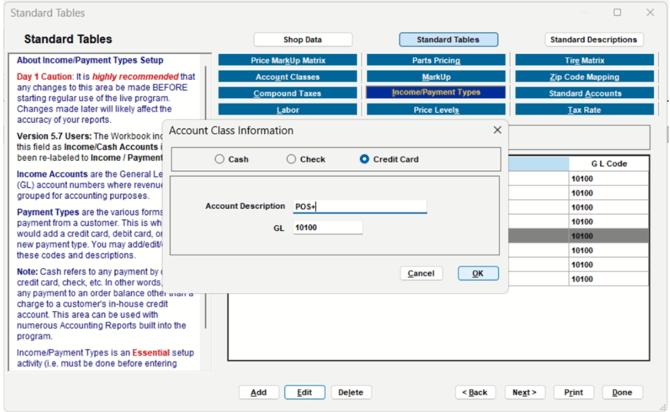
This is the payment type/tender type POS+ uses when reconciling a transaction to the software's ledger. Where possible, POS+ will reconcile a transaction as payment type 'POS+' with the gateway authorization code written in the notes or memo field. If the POS+ payment type cannot be created in the software, POS+ will choose the next best option.
For this integration, the reconciliation payment type is:
It is your responsibility to add the correct payment type to the software. Failure to do so will break the reconciliation flow.
Marketing Demo Video
Browser Extension
Integration Type
This integration requires the On- Prem software to be installed.
Set Up
-
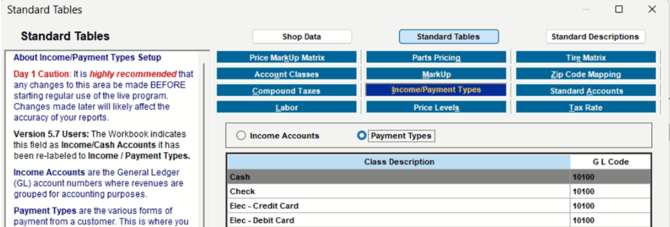
Click “Setup”

-
Select "Standard Tables"
-
Select "Income/Payment Types."
-
Underneath, select the "Payment Types" radio button.
-
-
Modify an existing type or add a new POS+ entry
-
Click “OK”
-
Click “Done”
Support
- Moving the mouse or typing on the keyboard while POS+ is running a payment activity might cause POS+ to fail. Therefore, inform the merchant not to engage in these activities while running a transaction through POS+. If the transaction fails, simply retry the operation and remove hands from the mouse and keyboard for a few seconds.
- If the user’s machine is too slow, POS+ might timeout waiting for a user’s activity. While we have never seen this in practice, it is possible that people are running 20+ year old machines and the machine is simply incapable of running a POS+ integration.
- Ensure the user’s Mitchell1 version is supported by POS+.
- Firewalls can prevent the POS+ executable from installing. Please consult with the customer’s network personnel to overcome any obstacles.