.png?width=300&height=300&name=Untitled%20design%20(6).png)
VL300 Standalone PIN Pad QRG
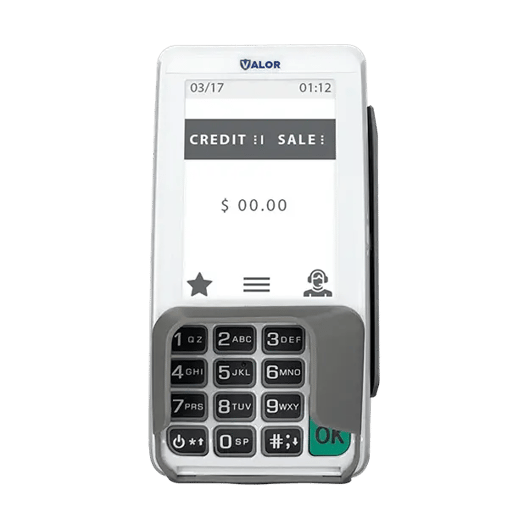
A quick guide to setting up and using the VL300 standalone PINPad.
|
|
Select PIN Pad Type
- Press the Cancel key on the idle screen (Receiving Mode). Choose the PIN pad type and press 1.
- Select Standalone or press 2 to convert the PIN pad into a standalone.
- Select Yes on the confirmation dialog box. The terminal will check the Ethernet connection; on a successful connection it will act as a standalone after reboot by entering the EPI screen.
CREDIT SALE
- Enter Transaction Amount and tap OK.
- Swipe/Insert/Tap card on Present Card screen or start typing card number for Manual Entry.
- Sign and Tip if prompted.
- Select receipt delivery method.
DEBIT SALE
- Tap Credit until Debit is displayed.
- Enter Transaction Amount and press OK.
- Swipe/Insert/Tap card on Present Card screen or start typing card number for Manual Entry.
- Enter PIN and Tip if prompted.
- Select receipt delivery method.
CREDIT VOID
- Tap Sale until Void is displayed. Press OK and enter password.
- Select Tran Number or Card Number.
- If Tran Number, enter transaction number.
- If Card Number, enter last 4 digits of card.
- Transaction will appear on screen. Press OK to void the transaction.
- Select receipt delivery method.
CREDIT REFUND
- Tap Sale until Refund is displayed. Enter Refund amount and press OK.
- Enter password if prompted.
- Swipe/Insert/Tap card on Present Card screen or start typing card number for Manual Entry.
- Select receipt delivery method.
CREDIT PREAUTH
- Tap Sale until PreAuth is displayed. Enter dollar amount and press OK.
- Swipe/Insert/Tap card on Present Card screen or start typing card number for Manual Entry.
- Select receipt delivery method.
CAPTURE PREAUTH (Credit)
- Tap Sale until Ticket is displayed. Enter dollar amount, press OK and enter password.
- Select Tran Number or Card Number.
- If Tran Number, enter transaction number.
- If Card Number, enter last 4 digits of card.
- Transaction will appear on screen. Press OK to Complete transaction.
- Sign and Tip if prompted.
- Select receipt delivery method.
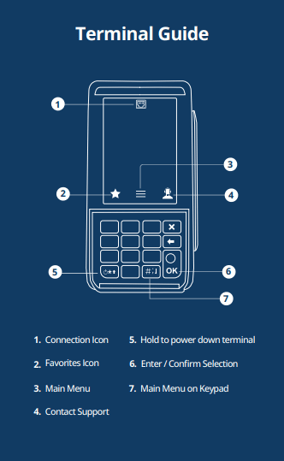
★Favorites Menu
- SETTLEMENT — Option to settle the current batch.
- CHANGE PASSWORD — Set one general password OR create custom passwords for settlements, voids/refunds & removing custom fee.
- DOWNLOAD PACKAGE — Applies parameter changes or updates version on device.
- COMM CONFIG — Configure your internet connection settings.
- REBOOT — Power cycles device.
- REMOTE DIAGNOSTICS — Allows ISO to remotely troubleshoot the device.
- PINPAD TYPE OPTION — Users can select either "Work with VL100" or "Standalone" mode from the menu.