Skip to content
English
  • There are no suggestions because the search field is empty.

VL550 SIM Card Install

SIM Card Installation

  1. Before Inserting the SIM card, ensure to Power Down the Terminal and remove the Back Cover. 
    SIM Install_KB Media


    Nano Sim-1_KB Media


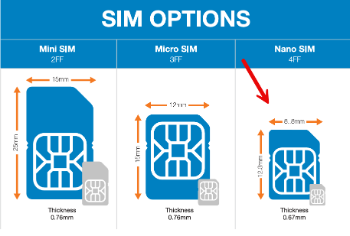
    SIM Sizes Diagram 1.


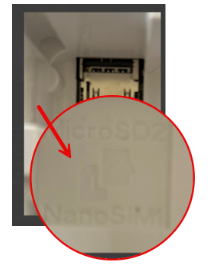
  2. Proceed to insert the Nano SIM card into SIM SLOT 1, ensuring the gold contacts face down. The cutout is in the top left corner as displayed in Diagram 1, and the card is firmly seated. 

  3. Replace the back cover, then press the power button the left-hand side of the terminal for 10 seconds.

  4. Enter the EPI#, attempt to download, it will error out, then connect to Wi-Fi and complete download.   

    Note: Only 1 APN should exist: att hspa+

APN Set up for 4G 

  1. Press the power button for 10 seconds to force a restart and then proceed to disable the KPN settings. 

  2. Tap the (≡) three lines on the bottom of the screen. 

  3. Go to Settings > SIM Config 

  4. Tap the triangle (bottom navigation) → SIMs 
  5. Scroll to Access Point Names.
  6. Click the + sign (top right).
    1. Turn Wi-fi off 
    2. Select Name → enter: att hspa+ 
    3. Select APN → enter: optconnect01.com.attz 
    4. Tap OK → 3 dots (top right) → Save 
  7. Delete all other APNs one by one, by touching the name and then delete APN 
  8. Tap the sideways triangle and turn Roaming OFF. 
Note: The device should connect automatically. If not, power cycle the terminal.
Additional Considerations:
  • Verify that the APN Name and APN are correct.
  • Turn Wi-Fi on, run a software update, then reboot the terminal. Once rebooted, turn off Wi-Fi.
  • If the issue persists, conference in Valor at 800-615-8755 opt 2.


GSM/GPRS POS Error Codes table with search and sorting
POS Error Codes Related to the device types Response Message Comments - for the Error code
104601XX VL100 / VL110 GSM Select Failed SIM-related GSM error. Remove and reinsert the SIM, then restart the POS and try again. If the problem persists, contact support@valorpaytech.com.
104602XX VL100 / VL110 GSM Open Failed SIM-related GSM error. Remove and reinsert the SIM, then restart the POS and try again. If the problem persists, contact support@valorpaytech.com.
104603XX VL100 / VL110 GSM Send Failed SIM-related GSM error. Remove and reinsert the SIM, then restart the POS and try again. If the problem persists, contact support@valorpaytech.com.
104604XX VL100 / VL110 GSM No Response SIM-related GSM error. Remove and reinsert the SIM, then restart the POS and try again. If the problem persists, contact support@valorpaytech.com.
104605XX VL100 / VL110 GSM Response Format Error SIM-related GSM error. Remove and reinsert the SIM, then restart the POS and try again. If the problem persists, contact support@valorpaytech.com.
104606XX VL100 / VL110 GSM Initial Failed SIM-related GSM error. Remove and reinsert the SIM, then restart the POS and try again. If the problem persists, contact support@valorpaytech.com.
104607XX VL100 / VL110 GSM Command Failed SIM-related GSM error. Remove and reinsert the SIM, then restart the POS and try again. If the problem persists, contact support@valorpaytech.com.
104609XX VL100 / VL110 GSM Sim Not Ready SIM may not be ready. Restart the device and try again. For brand-new devices, download the latest firmware/application and retry. If the problem persists, contact support@valorpaytech.com.
104610XX VL100 / VL110 GSM SIM Locked SIM may be locked by the provider. Restart the POS and retry. If the problem persists, contact support@valorpaytech.com.
104612XX VL100 / VL110 GSM Bad Parameters Possible GPRS parameter issue on the POS. Verify and correct GPRS parameters, reboot the POS, and try again. If the problem persists, contact support@valorpaytech.com.
104613XX VL100 / VL110 Phone Book Format Error Generic GPRS problem. Reboot the POS and try again. If the problem persists, contact support@valorpaytech.com.
104614XX VL100 / VL110 GSM Buffer Overflow Generic GPRS problem. Reboot the POS and try again. If the problem persists, contact support@valorpaytech.com.
104615XX VL100 / VL110 GSM Record Not Found Generic GPRS problem. Reboot the POS and try again. If the problem persists, please contact support@valorpaytech.com.
104620XX VL100 / VL110 GSM SIM Select Failed Generic GPRS problem. Reboot the POS and try again. If the problem persists, please contact support@valorpaytech.com.
104622XX VL100 / VL110 GSM Not Supported Generic GPRS problem. Reboot the POS and try again. If the problem persists, please contact support@valorpaytech.com.
104623XX VL100 / VL110 GSM Unknown Module Generic GPRS problem. Reboot the POS and try again. If the problem persists, please contact support@valorpaytech.com.
104624XX VL100 / VL110 GSM INIT Cancel Generic GPRS problem. Reboot the POS and try again. If the problem persists, please contact support@valorpaytech.com.
104625XX VL100 / VL110 GSM IO Busy Generic GPRS problem. Reboot the POS and try again. If the problem persists, please contact support@valorpaytech.com.
104626XX VL100 / VL110 GSM No Carrier Generic GPRS problem. Reboot the POS and try again. If the problem persists, please contact support@valorpaytech.com.
104627XX VL100 / VL110 GSM SIM Card Not Present — Please Insert SIM, Try Again… POS does not detect a SIM card. Remove and reinsert the SIM, restart the POS, and try again. If the problem persists, please contact support@valorpaytech.com.
10XXXXXX VL100 / VL110 GSM Error Generic GPRS problem. Reboot the POS and try again. If the problem persists, please contact support@valorpaytech.com.